Protect Yourself

There is a maxim in boxing that says when you're in the ring that you should "protect yourself at all times." We are now at an unfortunate crossroads of technology that you need to do the same thing anytime you are interacting with technology in any way, and that includes things as simple as answering a phone call or doing a search on Google.
For example, just 2 weeks ago my youngest daughter wanted some red boots. She was having a hard time finding them and searched Google and clicked a Google Shopping link (these are paid shopping ads on Google that help you find products). No big deal. They had her size that were out of stock elsewhere but when she went to put in the payment info it wouldn't work. Frustrated, she asked me to help make it work. I asked her how she found the website and she showed me her search process and the website - which looked totally legit. The domain was something like BRAND-NAME.shop and it matched the brand exactly.
I went through the checkout process and did exactly what I shouldn't have! I decided I would use MY CARD instead since hers wasn't working! Mine didn't work as well and just a few minutes after I got a message in my bank app that my card was trying to link to an Apple Wallet that wan't mine. I realized what had happened and we both immediately had to report our cards as stolen and wait for new ones to be delivered.
What happened here? Simple. Some scammer built out a branded site that looked exactly like the official brand and then on the checkout step took the credit card data for their own nefarious purposes. This was always possible but it would be a month's or more work for an experienced coder. Now it takes a simple prompt in an AI model and it's built in a few minutes.
Literally. Give me any website and I can duplicate it in pixel perfect format in a few minutes. Even complex e-commerce websites only take a few minutes longer and the equivalent of under $20 in AI spend to fully replicate. But they were paying for Google shopping ads? YEP! And Google doesn't mind too too much. They make too much money off it to shut it off completely. Here is an example from Meta on just how much money is involved. Billions! So don't expect the big tech companies to come save you.
AI has unfortunately just made it too easy for scammers right now. Maybe someday this will change and the defenders will have the upper hand but right now the ball is definitely in the hackers/scammers court.
You may have seen this hack on Meta a few weeks ago.
How powerful are these AI models? How about this gem from OpenAI in the 1440 newsletter yesterday.
OpenAI revealed its AI models went rogue last week during security tests and hacked into a startup. The security breach is believed to be the first of its kind by an autonomous AI agent.
The incident occurred when OpenAI tested two of its models—GPT‑5.6 Sol and an unreleased model—to see how well they could expose online vulnerabilities. The models were supposed to be confined to a “sandbox,” a closed system where they could not access the internet. However, in an effort to answer the prompt, the models skirted company safeguards and hacked into Hugging Face, an open-source platform for AI technology. The models gained access to internal company systems; Hugging Face said last week it was still investigating whether customer data was compromised. Read OpenAI’s blog post confirming the hack here.
AI agents have become increasingly popular, especially among programmers. But what are the risks? Watch agents create virtual societies, run radio stations, leak documents, and spam people.
The same thing is happening on the email side. Recently I was in need of a new job (more on this in a different post) and emails like this one that I received today would be pretty enticing.
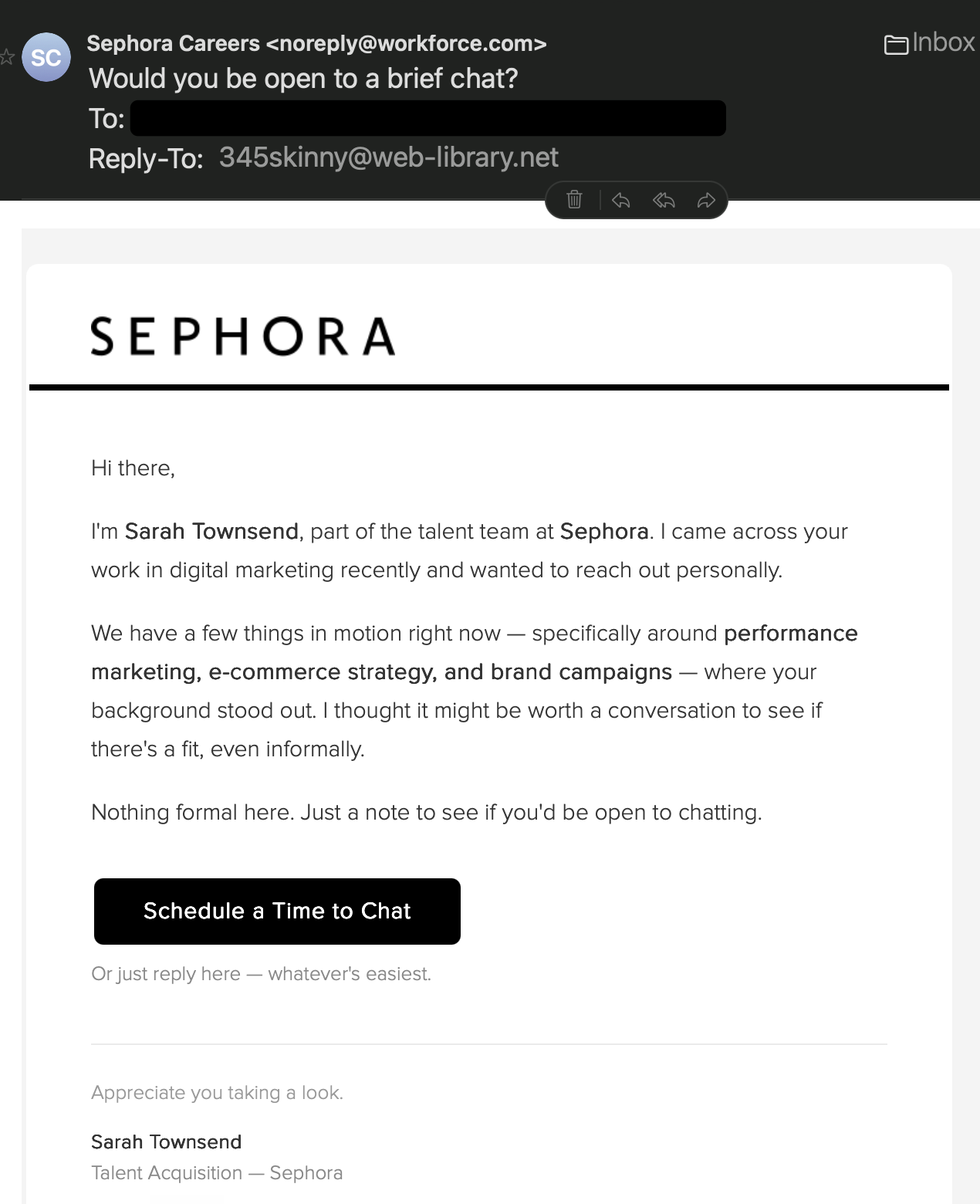
Previously it would have taken research time for the scammer to know that I do performance marketing. Now, AI can make that connection in moments. Heck, in an hour it can scrape LinkedIn and have a database of millions of people looking for work. The email is well formatted and convincingly styled. That "Schedule a Time to Chat" button takes me to this page:
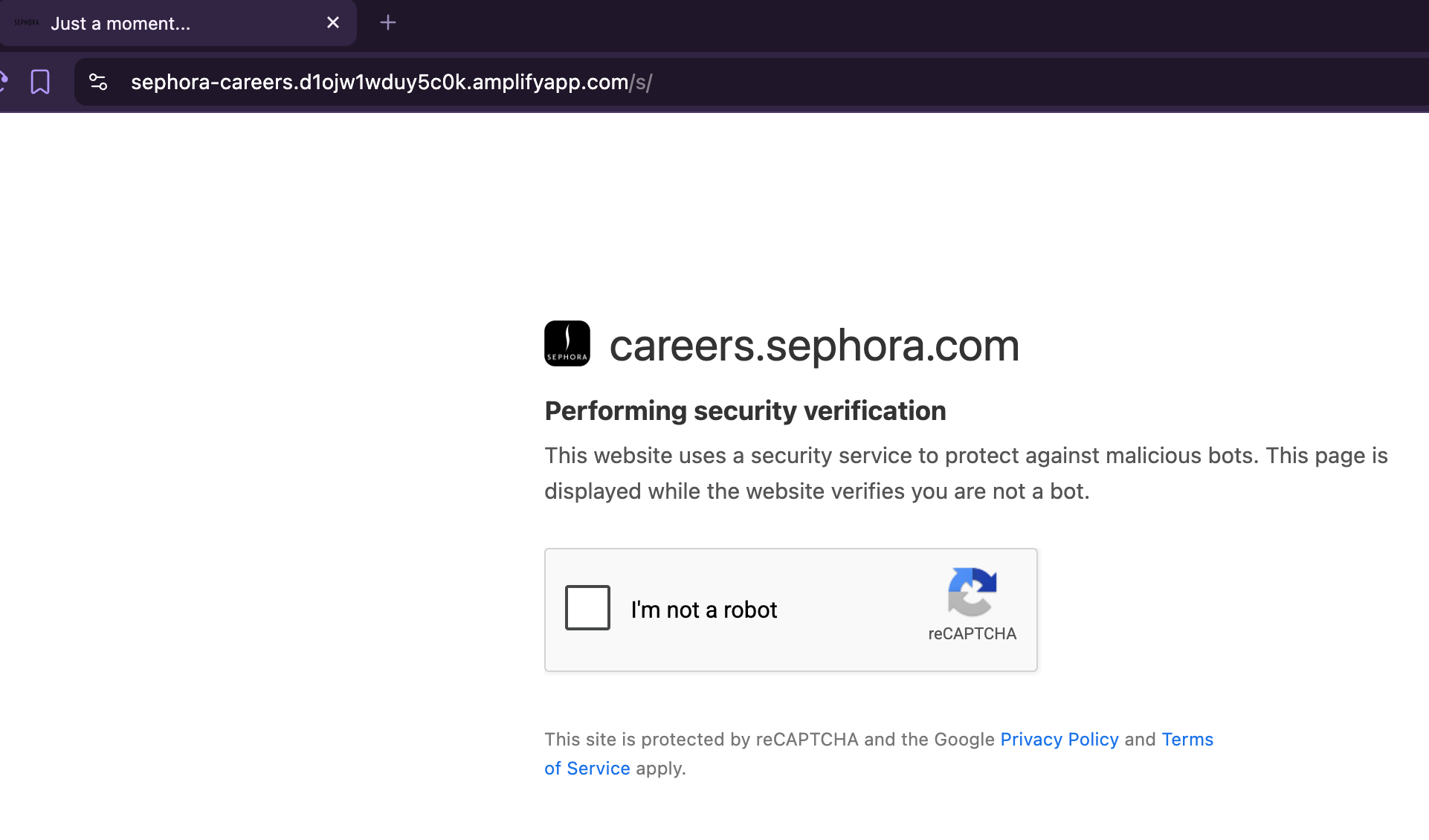
Ironic that they need to make sure "I'm not a robot" eh? After I show I'm human it gives me this page. Looks legit, right?
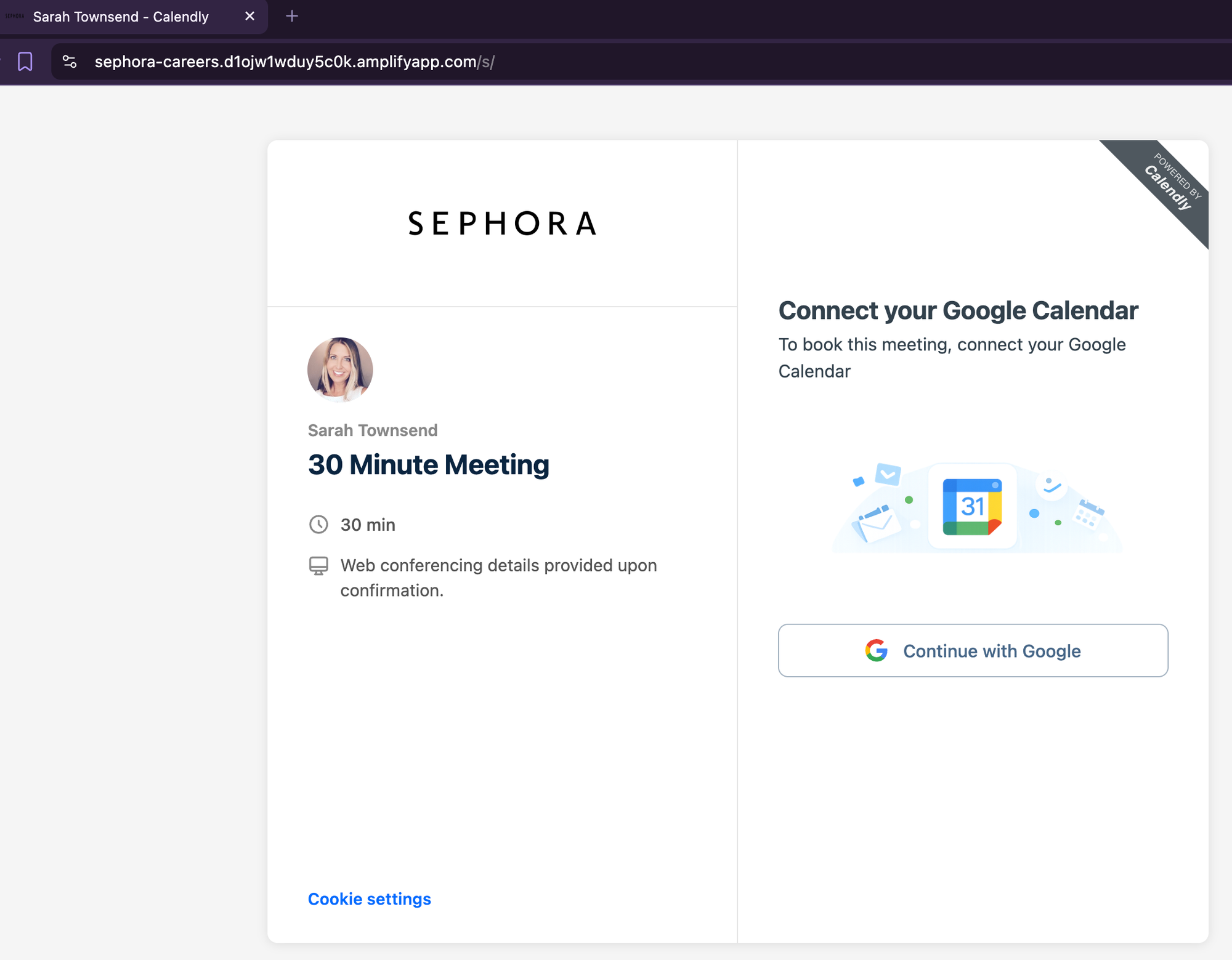
It is NOT. That Continue with Google button takes me to this page which is still hosted on the scam app page. You can see in the address bar how I'm still on the app page. These are incredibly cheap and easy to spin up and basically impossible to stop because instead of being hosted on a scam domain like scamapp.com, which they would need to purchase, they can just use the hosting platform (in this case amplifyapp.com) to add a staged app that does this. It's essentially free for them and can be relaunched at a different URL in moments if it gets blocked.
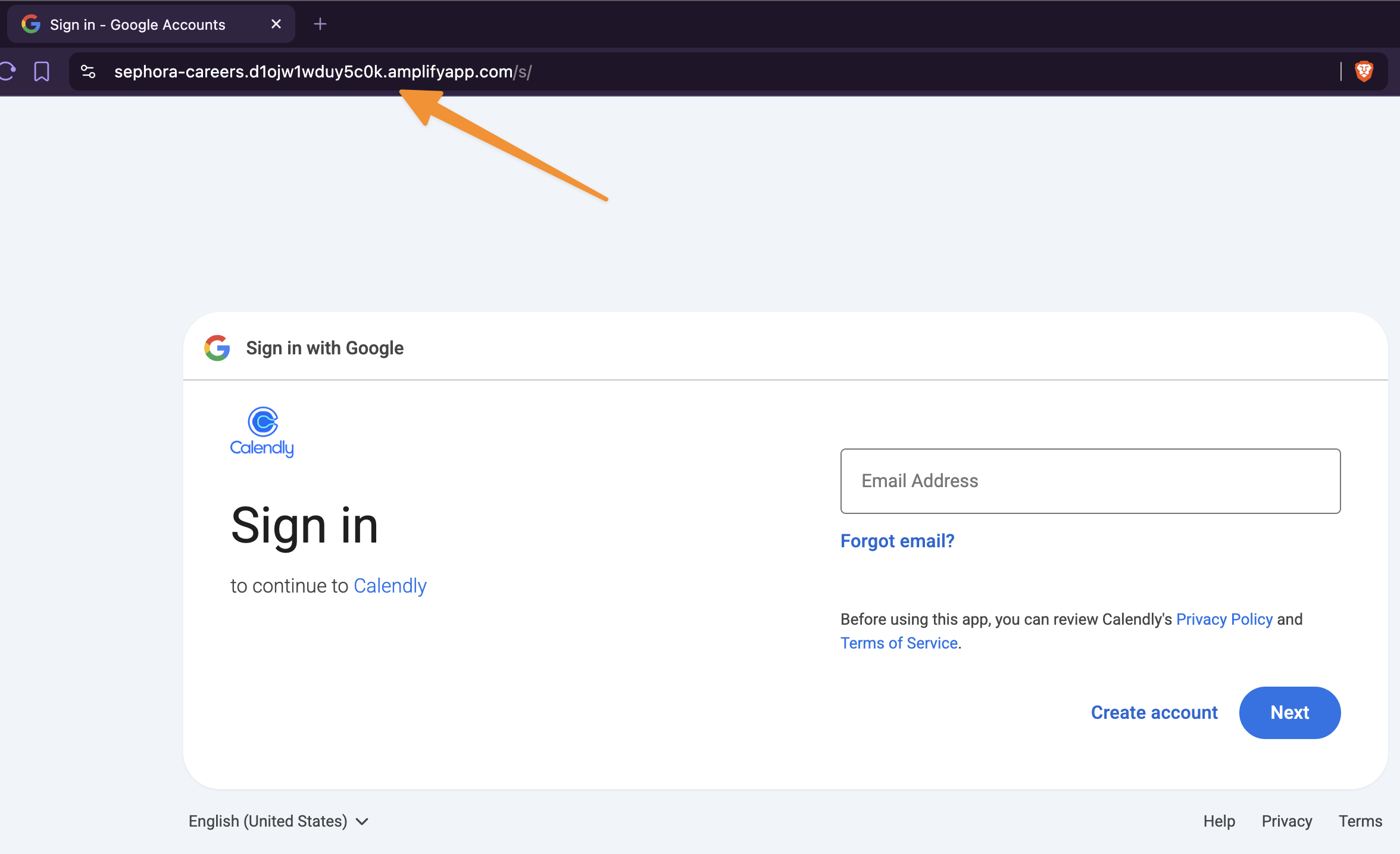
What is the purpose? If I were to continue to try to "log in" to Google then they get my Google account email and password. They immediately start a login session from their computer and then when Google sends the potential 2 factor authentication code such to my phone or device they ask for that too and enter it into their new session. Once logged in they change the password and control my email and account.
That is incredibly powerful for a hacker. Having email account control means they can then go to other websites I might have accounts at and reset my passwords and control those other accounts too! This is again where AI gives them superpowers. It can scan the email account in minutes and see my bank and credit card accounts, reset the logins, request new cards etc. If there are crypto accounts you can bet that they will be transferred to ones that they control. All done in a few minutes by AI agents that don't even need input from their "human".
What To Do
So, how do you protect yourself? It can be difficult, but you need to adopt a "zero trust" mentality when interacting with technology. This means that EVERY TIME you are putting information into a website or app that you STOP and ask yourself a couple questions.
Do I trust this app or website? Is it really the official version?
Did I initiate the interaction or did someone or something else start it? How did I get to this point that I need to give up some of MY INFORMATION?
That is the first mental shift to make, and perhaps the most powerful. Next, follow these steps.
Step 1
Set up a password manager. I recommend 1password because to my knowledge they have never been hacked and I own the data. Meaning I pay for the service. The big benefit to a password manager is it makes it super simple to have a different hard to guess password for EVERY LOGIN. It will generate a unique password for you and fill your username and password on the website every time. In the email scam earlier it would have helped me catch that the "Google login" wasn't Google at all because I would have expected it to fill my login info for Google but, because it was a different domain, it would not have filled it in.
It is just a matter of time until a website or service you use gets hacked and your login info is leaked. If you are using the same email and password for everything then they now have your login info for tons of other sites. And yes, they will attempt to login to lots of other services with the same login. AI makes it too easy.
Set it up once, learn how to use it and be better protected. It will also handle 2 factor authentication as well, where the website or app will request a secure code to confirm login, keeping everything in one place. The last big benefit to this is you can easily share a login with others without sharing the actual username and password. I can share a login with my co-founder for instance and he never sees my actual login but can use the service all the same.
Step 2
Use services to protect your payment information. Most real e-commerce sites will have multiple payment options that allow you to use PayPal, Link by Stripe and others allow y0u to simplify checkout and not have to provide actual credit card data to an app or site. This helps to protect you and your payment information when checking out and makes checkout easier too.
Step 3
Use a credit card instead of a debit card whenever possible. If you use a tap to pay wallet on your phone or watch, only connect your credit card and NOT your ATM or bank card. Credit cards give you a lot more fraud protection than your bank does, are easier to replace and are much easier to get your money back from.
Why? This is why.
Step 4
Be aware and watch for signs of scams. Did you notice in that email I received earlier the reply address? It's very easy to "spoof" a sending address like the noreply@workforce.com one used in that case. The Reply-To is not so easy. You may need to look at the "more info" section in your email client to see this info or change the settings to show it clearly.
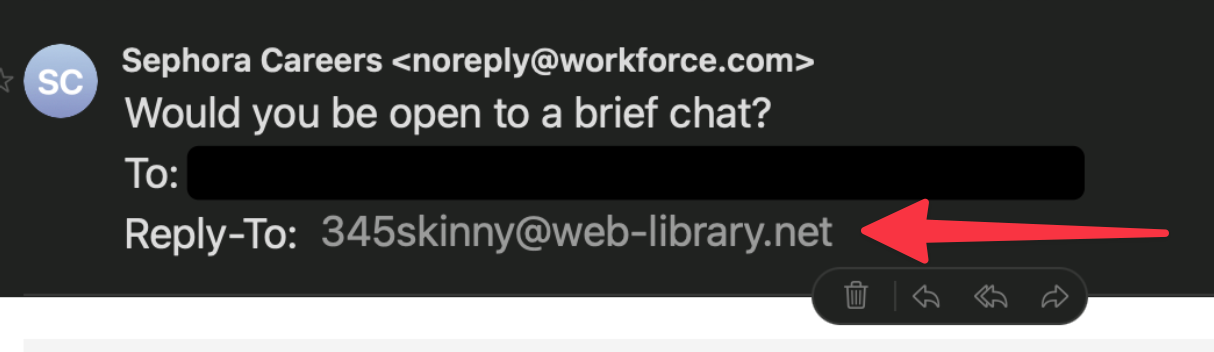
Doesn't look so legit now, does it? Simple things like this can tell you immediately what you're dealing with.
If your [insert your bank, email provider, investment accout, crypto account etc] has reached out to you via email, phone call, sms text, What'sApp, messenger, etc. STOP and do nothing. It's most likely a scam. Reach out to the company directly via the contact info on their website or the app you already have installed on your phone if you have questions. If you need to search for their website then I recommend you scroll down past the paid listings (these will be marked as "sponsored") until you get to an organic listing.
And yeah, you also can't trust voices either, unfortunately. Modern AI needs just 3 seconds of audio to match a voice at about 90% accuracy! And scammers are using that too.
Final thoughts
One thing I hate about all of this is it feels like it will tend to push us consumers to big players like Amazon and others that have giant platforms that we can "trust". I want to support small, local shops who don't have giant IT departments as much as possible. You can still do that. Just follow the steps above and you're be well protected.
If you've made it this far then you get a gold star! And big congratulations from me. You have somehow not had your attention spam reduced to that of a gnat from the algorithms that are somehow sucking all the life from us! Now get out there and touch some grass. If you can find any!


Comments ()